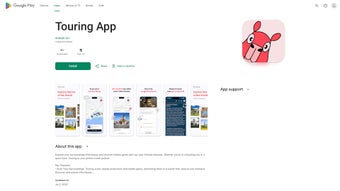

Download Touring App – Travel Planner, Location Insights, Free Explorer Tool
Overview – Why Touring App Is the Modern Traveler’s Companion
In a world where wanderlust meets technology, Touring App emerges as a powerful web‑based tool designed for the curious explorer. Whether you’re strolling through the historic streets of Rome, hiking the misty trails of Patagonia, or simply navigating a new city for the first time, this application turns any location into a living museum. Powered by Google Maps, Touring App works wherever the map service is available, delivering location‑based insights that go far beyond the typical “top‑10 attractions” list.
The app offers rich narratives, high‑resolution images, and audio stories that let users absorb cultural context without flipping through guidebooks. Its intuitive interface is built for quick discovery: a tap on the map surface reveals hidden gems, local legends, and practical tips in seconds. Moreover, Touring App respects user preferences by allowing content consumption in either read‑or‑listen mode, making it ideal for sight‑seers who love to keep their eyes on the scenery.
Future updates promise even more immersive experiences, such as on‑demand search for distant locations, curated itineraries crafted by travel experts, and an interactive chat assistant that answers questions in real time. With a strong commitment to privacy—complete encryption and easy data‑deletion requests—Touring App positions itself as a secure, free, and constantly evolving travel companion.
Core Features & Future Roadmap – What Sets Touring App Apart
- Location‑Based Discoveries: Instantly view nearby attractions, restaurants, museums, and hidden spots directly on the map.
- Rich Multimedia Content: Each point of interest includes detailed descriptions, high‑definition photos, and optional audio narration.
- Read or Listen Mode: Choose the consumption style that fits your travel style—read text on the go or listen hands‑free while you explore.
- Google Maps Integration: Seamlessly works wherever Google Maps is supported, ensuring accurate geolocation and navigation.
- Secure Data Handling: End‑to‑end encryption protects user data, and a one‑click option allows complete data removal.
- Future Feature – On‑Demand Search: Plan trips beyond your immediate vicinity by searching for any destination worldwide.
- Future Feature – Curated Explorations: Access expertly crafted itineraries for major cities, natural parks, and cultural routes.
- Future Feature – Interactive Chat: Get personalized recommendations, answer quick queries, and receive real‑time assistance.
- Future Feature – Hands‑Free Mode: Automatic location‑based alerts notify you of nearby points of interest without needing to tap the screen.
The current feature set already delivers a compelling experience, but the development roadmap shows a clear vision for expanding the app’s utility. By adding on‑demand search capabilities, users will be able to research destinations months in advance, building itineraries that feel as personalized as a private guide. Curated explorations will reduce the planning overhead for first‑time visitors, offering a “tourist‑in‑a‑box” solution that still leaves room for spontaneous detours.
The interactive chat, powered by AI, promises to answer specific questions—like “Where can I find the best street food in Bangkok?”—in seconds, removing the need to scroll through endless forum threads. Hands‑free mode, the crown jewel for safety‑conscious travelers, will issue subtle notifications as you walk, ensuring you never miss a historic plaque or a scenic overlook while keeping your eyes on the road. Together, these upcoming features reinforce Touring App’s ambition to become the ultimate, all‑in‑one travel companion.
Installation, Usage & Compatibility – Getting Started on Any Device
Step‑by‑Step Installation Guide
Touring App is a web‑based platform, which means you don’t need to download a bulky installer for most devices. However, a lightweight progressive web app (PWA) is available for those who prefer an icon on their home screen. Follow these simple steps:
- Open your preferred browser (Chrome, Safari, Edge, or Firefox) on Windows, macOS, Android, or iOS.
- Navigate to https://touringapp.com.
- Click the “Add to Home Screen” prompt that appears at the bottom of the page (on mobile) or select “Install App” from the browser menu (on desktop).
- Accept the permission request to enable location services; this is essential for real‑time point‑of‑interest discovery.
- The app icon will appear on your desktop or home screen. Tap it to launch the full‑screen experience.
First‑Time Usage Tips
Upon launching, you’ll be greeted with a brief tutorial that explains how to toggle between read and listen modes, how to filter categories (e.g., “food”, “history”, “nature”), and how to enable hands‑free alerts. The tutorial can be skipped and revisited later via the Settings menu. To start exploring, simply allow the app to access your location, then zoom in or out on the map.
Points of interest appear as colored markers; tapping a marker opens a concise card with an image, a short description, and a play button for audio narration. Use the search bar at the top to look up specific addresses, landmarks, or keywords. The app automatically caches the most recent map tiles and content, ensuring a smooth experience even in low‑bandwidth areas.
Supported Operating Systems
Touring App is built to run on the following platforms:
- Windows 10 and later (Chrome, Edge, Firefox)
- macOS 10.13 (High Sierra) and later (Safari, Chrome)
- Android 8.0 Oreo and newer (Chrome, Firefox)
- iOS 13 and newer (Safari, Chrome)
Because the application relies on standard web technologies (HTML5, CSS3, JavaScript), it remains lightweight and responsive across devices. The PWA version ensures offline access to previously visited locations, making it ideal for travelers who may encounter spotty internet connections. Regular updates are pushed automatically, so you always benefit from the latest security patches and feature enhancements without manual intervention.
Pros and Cons – An Honest Assessment of Touring App
Advantages
- Free & Secure: No subscription fees, with end‑to‑end encryption protecting user data.
- Cross‑Platform Compatibility: Works on Windows, macOS, Android, and iOS via browser or PWA.
- Rich Multimedia Content: High‑quality images and optional audio narrations enhance immersion.
- Location‑Based Alerts: Real‑time discovery of nearby points of interest without manual searching.
- Future‑Ready Roadmap: Upcoming on‑demand search, curated itineraries, and AI chat promise continued value.
- Lightweight Design: Minimal storage footprint compared to traditional travel guide apps.
- Customizable Consumption: Users can switch between reading and listening at any moment.
Drawbacks
- Internet Dependency for New Content: While cached data works offline, fresh information requires an active connection.
- Limited Offline Maps: Full map tiles are not stored offline, which may affect navigation in remote areas.
- Reliance on Google Maps: Service outages or regional restrictions can impact functionality.
- Audio Narration Language Options: Currently limited to English and a few major languages; more translations are planned.
- No Built‑In Booking System: The app focuses on discovery rather than reservations, requiring users to switch to other platforms for bookings.
Frequently Asked Questions
Is Touring App completely free to use?
Yes, Touring App is free for all users. There are no hidden subscription fees or in‑app purchases. Future premium features, if introduced, will be optional and clearly marked.
Can I use Touring App without an internet connection?
The app caches previously visited locations, so you can view saved content offline. However, to discover new points of interest or download fresh multimedia, an internet connection is required.
How does Touring App protect my privacy?
All user data is encrypted both in transit and at rest. You can request complete deletion of your data from the Settings menu, and the app does not sell or share personal information with third parties.
Will Touring App work on my older smartphone?
The minimum supported versions are Android 8.0 Oreo and iOS 13. Devices older than these may experience performance issues or be unable to run the PWA.
How can I contribute feedback or suggest new features?
Feedback can be submitted directly through the in‑app “Help & Feedback” section or via the contact form on the official website. The development team actively reviews user suggestions for upcoming releases.
Conclusion – Start Exploring Today
Touring App bridges the gap between traditional guidebooks and modern navigation tools, delivering contextual, multimedia‑rich insights right at your fingertips. Its free, secure, and cross‑platform design makes it accessible to anyone with a smartphone or computer, while the roadmap promises even deeper personalization through AI chat, curated itineraries, and hands‑free alerts. If you value immersive storytelling, seamless discovery, and a commitment to privacy, Touring App is a must‑download for your next adventure. Ready to transform the way you travel? Visit touringapp.com, add the app to your home screen, and start exploring the world with a richer, more informed perspective today.



.png)



